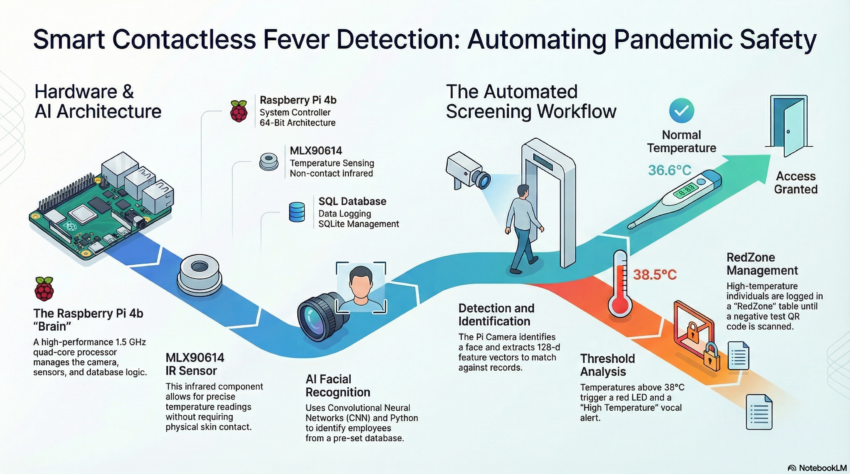
In 2021, as Algeria – like the rest of the world – was still navigating the practical challenges of COVID-19 screening, I built a system designed to address one of the most common bottlenecks at building entrances: the need for simultaneous identity verification and temperature measurement, done quickly, without physical contact, and with a logged record of every interaction.
The project was my MSc graduation project, carried out between January and June 2021 at Badji Mokhtar – Annaba University. Its official title was Design and Development of a Smart Contactless Thermometer, but that undersells what it actually was: a real-time, embedded, multimodal screening system combining facial recognition, infrared temperature sensing, QR code scanning, and automated access control, all running on a Raspberry Pi 4B.
This post walks through what I built, how it worked, and what I learned from it. For those interested, you can find the full thesis here.
The Problem
Manual COVID screening at building entrances in 2021 typically meant a security officer holding an infrared thermometer to each person’s forehead, checking an ID or badge, and logging the reading by hand. It was slow, contact-dependent (which can increase the spread of the virus), and produced records that were difficult to search or audit. The person doing the screening had no way to automatically flag someone who had already been turned away that day, and no structured way to handle the case where someone with a previous high-temperature reading later presented a negative COVID test result.

I wanted to build a prototype that automated all of this: detect and identify the person, measure their temperature without contact, make an access decision, log everything to a database, and handle the edge case of clearing someone from a high-risk list when they could prove a negative test.
The Hardware
The system was built around a Raspberry Pi 4B, which handled all processing: face recognition, sensor reading, database operations, and GPIO control, in real time. The core components were:
- Raspberry Pi Camera Module: mounted to the enclosure for live face detection and recognition.
- MLX90614 IR temperature sensor: a non-contact sensor communicating over I²C, reading object surface temperature without physical contact.
- Green and red LED indicators: providing immediate visual feedback on access decisions.
- Text-to-speech output (pyttsx3): the system spoke the result aloud, so the person at the entrance received audio confirmation without needing to read a screen.
For the enclosure, I took a standard project box and made several modifications: cut an aperture for the camera module, drilled mounting holes for the IR sensor and the two LEDs, and designed a front label using Canva, printed and applied to the enclosure to give it a clean, finished appearance. It was functional enough to demonstrate at an actual building entrance, which is where I tested it.
The Software Architecture
The system had three parallel pipelines running in a single loop: face recognition, temperature measurement, and QR code scanning. Here is how each one worked.
Face Recognition
Known faces were loaded at startup from an ImagesAttendance/ directory — one image per person, filename used as the identity label. Each image was encoded using the face_recognition library (dlib under the hood), producing a 128-dimensional face embedding. These encodings were stored in memory for comparison.
In the main loop, each webcam frame was downscaled to 25% of its original size before face detection — a straightforward optimisation that significantly reduced processing time on the Pi’s hardware without meaningfully affecting recognition accuracy at normal distances. Face locations were found using the HOG model, encodings were computed, and each detected face was compared against the known set using Euclidean distance. The best match below the recognition threshold triggered an identity assignment; the bounding box was drawn in green (normal temperature) or red (elevated temperature) around the face on the live display.
Temperature Measurement
The MLX90614 communicates over I²C and returns object temperature in degrees Celsius. The sensor was read on every positive face match. I used a simple threshold logic:
- If the reading was below 30°C, the person was too far from the sensor — the system prompted them to move closer, and no database entry was made.
- If the reading was between 30°C and 38°C, the temperature was considered normal. The system logged the identity, date, and temperature to the employees table, triggered the green LED, and announced a normal temperature via text-to-speech.
- If the reading was 38°C or above, the system logged the person to both the employees table and a separate RedZone table, triggered the red LED, and announced an elevated temperature.
Duplicate entries were prevented by checking whether the same name had already been logged with the same timestamp before inserting a new record.
QR Code Scanning and RedZone Clearing
This part of the system was practically interesting. The RedZone table accumulated people who had triggered the elevated-temperature threshold. The obvious question was: what happens when someone who was flagged later presents a negative COVID test?
I handled this with a QR code workflow. A QR code encoding two lines of text — the person’s name on the first line, and the string NEGATIVE on the second — would be scanned by the system. If both conditions matched (the name appeared in the RedZone table and the second line read NEGATIVE), the system removed that person from the RedZone database. This gave the operator a simple, structured way to clear individuals who had tested negative, without manual database access.
The QR scanning ran concurrently with face recognition in the same frame, using the pyzbar library to decode any barcodes present in the live image.
Limitations and What I Would Do Differently
Looking at this project from where I stand now — after a PhD in multimodal biometrics — there are several things I would approach differently.
The face recognition pipeline has no liveness detection. A photograph of a registered person held in front of the camera would likely pass. For a real access control system, this is a significant gap — presentation attack detection would need to be layered on top of the recognition step. At the time, the focus was on demonstrating the integrated system concept; spoofing resistance was out of scope for an MSc project. It is, ironically, exactly the kind of problem I went on to research in my PhD.
The temperature threshold of 38°C was a fixed value with no calibration for ambient conditions, sensor-to-subject distance variation, or individual baseline differences. A more robust implementation would incorporate environmental compensation and a dynamic threshold based on statistical population data.
The QR code clearing mechanism, while functional, was rudimentary from a security standpoint — anyone with a QR code containing the right name and the string NEGATIVE could remove an entry from the RedZone table. A production system would require cryptographically signed tokens issued by a verified testing authority.
Why This Project Still Matters to Me
This was the first time I built something that sat at the intersection of biometric recognition, embedded hardware, real-time decision-making, and a genuine access control problem. The system was imperfect in ways I now understand much better than I did in 2021. But it taught me something that no amount of purely algorithmic work does: that deploying a biometric system in a physical environment introduces constraints and failure modes that laboratory experiments do not surface. The enclosure has to fit. The sensor has to be at the right height. The lighting changes. People move. The database has to stay consistent across sessions.
Those lessons shaped the way I approach deployment in my subsequent research — including the TinyML work on ESP32 microcontrollers during my PhD — and they are part of why I am drawn to applied biometric security research that takes seriously the gap between what works on a benchmark and what works at a building entrance.
The code for this project is not publicly available, but the approach is described here in enough detail that it should be reproducible by anyone working with similar hardware.